Proximity message
A message or notification appears when the items in the basket are close to qualifying for a promotion. This reward is available when either a single product action is configured, or when a product action is configured along with a tender action or individual trigger code actions.
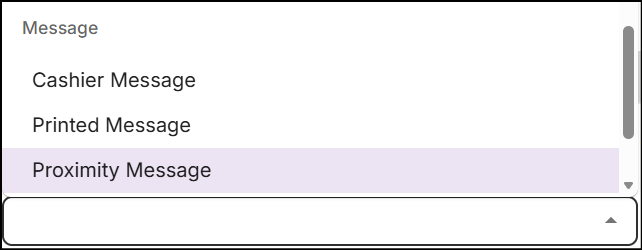
To configure the Proximity Message reward, navigate to the Actions & Rewards section, click on the Reward Type drop-down, and select 'Proximity Message' from the Message rewards.
-
Enter a Threshold Trigger value that must be greater than '0' for amount, weight, or volume; greater than '1' for quantity; and less than the value configured in the product action.
Note: The threshold trigger value can include decimals, except when the product action is based on quantity. The value set in the product action appears below the Threshold Trigger text field.

-
In the text editor, type a custom message to notify the customer. The text editor includes tabs for both the default and additional languages. By default, the tab for the default language is active for entering a message. You can switch to the additional language tab to type a message in another language. Click here to manage language preferences.
-
Choose Proximity Tags that you want to display with the message. The tags include:
Tag Description Offer End Date Shows the date when the promotion ends Spend Required Shows the additional amount required to spend Quantity Required Shows the additional quantity required to be added Weight Required Shows the additional weight required to be added Volume Required Shows the additional volume required to be added Here is an example of a proxy message:
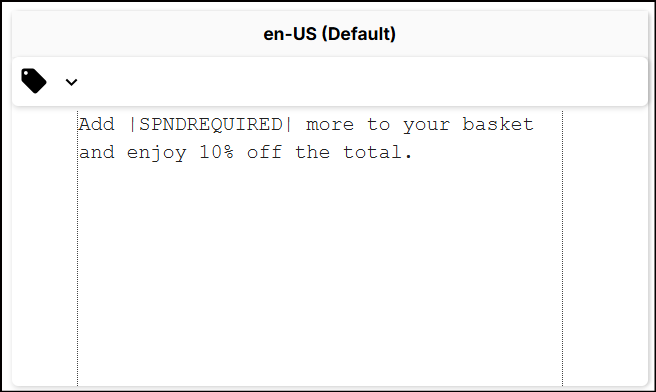
The |SPNDREQUIRED| tag is added to the message to display the additional amount the customer needs to spend to qualify for a discount on the total basket.
-
Click Save to configure the reward.
Tips and warnings
-
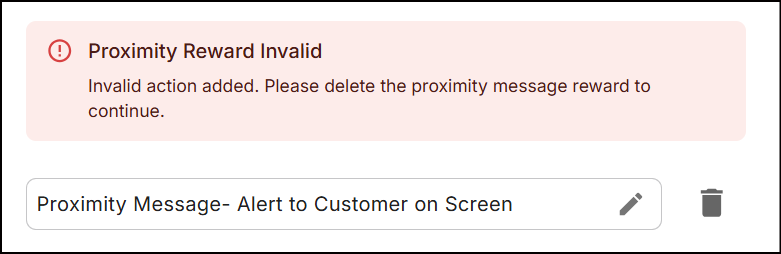
If you configure multiple product actions (of the same type or different types) or add other actions after saving the Proximity Message, the following error message appears:
-
If you change the value in the configured action to be less than the value set in the Proximity Message, the system displays an error.
-
If you configure a tiered reward, the threshold values for the next tier should fall between the product action value of the previous tier and that of the current tier.